Contents
An old time entry can sit in a billing system for months without becoming an invoice. Perhaps the lawyer has not approved it. Perhaps the work falls outside the agreed scope. Or perhaps the invoice went out, but the entry was never marked as billed. WIP aging helps a firm find these records before the reason is forgotten.
This guide explains what an aged work-in-progress report should show, how to review it, and which decisions belong with the responsible lawyer. It also separates delayed billing from a true write-down. The goal is a reliable process, not a promise that every hour recorded can be charged.
What WIP Aging Means in a Law Firm
Work in progress, or WIP, is work or an expense recorded against a matter that has not yet appeared on a final invoice. For an hourly matter, this often means time entries valued at the agreed rate and reimbursable expenses awaiting review. Some firms also track internal time on flat-fee and contingent matters, but that time does not automatically become a separate client charge.
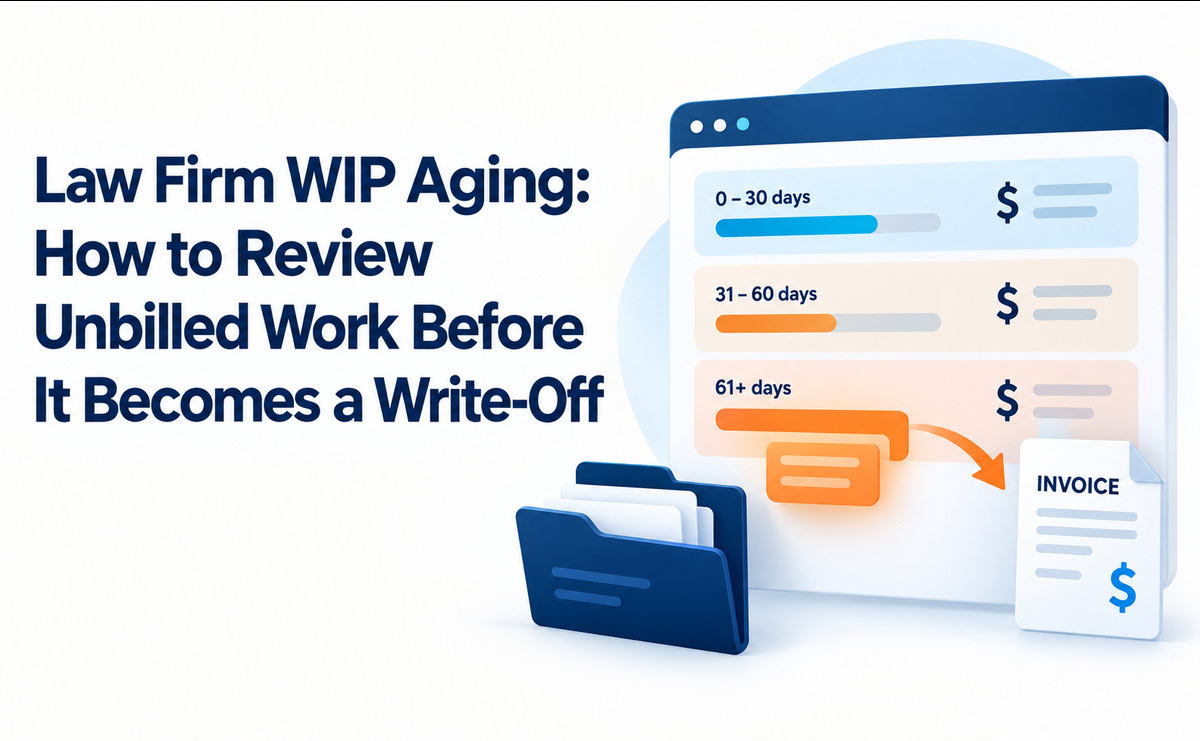
WIP aging groups those unbilled records by how long they have been outstanding. A firm might use 0–30, 31–60, 61–90, and more than 90 days. These are internal review bands, not universal billing deadlines. A matter’s agreement and billing cycle determine whether a given entry is actually late.
WIP aging starts with a clear clock
Agree on the date used to calculate age. The service date is usually most useful for time; the expense date serves the same purpose for costs. An entry worked on April 2 and entered on May 15 is 43 days older by service date than by entry date. Using the later date could hide a delay in capture.
For an as-of date of June 30, a June 1 service date is 29 days old. A May 1 service date is 60 days old. Count calendar days consistently, and label the as-of date on every report. Keep a separate field for the date an entry was created or edited. The gap between service and entry dates can reveal late recording, but it does not change when the work occurred.
Unbilled work is different from an unpaid invoice
WIP ends when eligible work is included in an issued invoice, subject to the firm’s system rules. Accounts receivable, or A/R, begins once an invoice is issued and remains unpaid. An aged WIP report answers, “Why has this work not been billed?” An A/R aging report answers, “Why has this bill not been paid?”
The distinction matters because each problem has a different owner and action. The billing lawyer may need to approve a narrative or fee adjustment before invoicing. An unpaid invoice calls for payment follow-up under the firm’s policy. Do not move a billed entry back into WIP simply because the client has not paid.
Clio’s legal performance definitions distinguish realization, the share of billable work invoiced, from collection, the share of invoiced work paid. Its term realization lockup describes the value of work done but not yet billed, expressed in days of annual revenue. A simple aged-entry report and a lockup figure answer related, but different, questions. Law firm profitability metrics can help place both in a broader scorecard.
Build a WIP Aging Report You Can Act On
A useful WIP aging report has enough detail to let a reviewer make a decision without guessing. Export at the entry level first. A matter summary is useful for prioritizing, but a single total can hide an incorrect rate, a disputed task, and an approved billing hold in the same number.
Include the fields behind each aged amount
For every record, capture the matter and client, responsible lawyer, timekeeper or expense owner, service date, entry date, hours or cost, agreed rate, calculated value, description, billing status, and last bill date. Add fee arrangement, invoice frequency, known cap or budget, and any billing hold with its reason and review date.
Separate time from expenses when building WIP aging bands. A filing fee paid for a client may need a receipt and a different approval path from a lawyer’s time entry. Keep standard-rate value separate from agreed-rate value. A report using standard rates can overstate what the engagement permits the firm to bill.
Keep an audit trail for later changes: original amount, revised amount, reason, reviewer, and date. If the system cannot retain that history, use an approved review log. WIP aging should make decisions visible, rather than quietly deleting inconvenient entries.
Reconcile the report before assigning risk
Check that WIP aging totals tie to the same underlying unbilled entries as the billing system. Remove duplicates and exclude entries already on issued invoices. Flag records on closed matters, entries with missing matter codes, negative amounts, and expenses without support. Where a bill was reversed, confirm whether the underlying work is legitimately unbilled again.
Then sort by the oldest service date, the total value by matter, and the percentage beyond the firm’s expected billing date. A $300 item held for a known court milestone may be less urgent than a $5,000 entry on a monthly billed matter that has no hold reason. Aging is a prompt to investigate, not a verdict about collectibility.
A WIP Aging Example: Follow the Entry, Not Just the Total
Assume a small firm runs its report on June 30. Its standard policy is monthly billing unless the engagement says otherwise. The following figures are invented examples for illustrating the review process.
| Unbilled item | Age and value | What the reviewer finds | Next action |
|---|---|---|---|
| Contract advice, hourly matter | 29 days; $1,200 | Complete description and agreed rate; June bill is being prepared | Include in the current pre-bill |
| Research, hourly matter | 60 days; $900 | Timekeeper used the wrong matter code | Correct with an audit trail, then review for billing |
| Filing expense | 75 days; $240 | Receipt is missing; client agreement allows approved disbursements | Obtain support and lawyer approval before charging |
| Flat-fee drafting time | 105 days; internal value $1,800 | Fee covers the work; next payment is tied to a later milestone | Keep as internal effort tracking; check the milestone, not an hourly invoice |
| Additional negotiation | 120 days; $2,400 | Client questioned whether the work was in scope | Escalate to the responsible lawyer; review agreement and communications before any charge or adjustment |
The five items total $6,540 in recorded or internal value. That is not $6,540 of revenue ready to bill. The flat-fee time may have no separate invoice value. The research entry needs correction. The older negotiation requires a scope decision. The WIP aging total would look precise while hiding the actual work left to do if every line were counted as collectible.
This example also shows why fixed age thresholds cannot stand alone. The 105-day flat-fee entry may be expected under its milestone terms. The 60-day research entry on a monthly matter deserves attention now. WIP aging works best when the report carries the billing context beside the age.
Review WIP Aging in Six Decisions
Begin the WIP aging review with the oldest unexplained items and the largest matters. The billing coordinator can prepare the list, but the responsible lawyer should decide issues involving scope, reasonableness, client promises, or reductions. Assign one owner and due date to every unresolved entry.

How to Handle Legal Debt Collection for Law Firms
1. Confirm the work and the agreed billing basis
Read the engagement agreement and any approved changes. Is this hourly work, a fixed fee, a contingency, or a mixed arrangement? Check the client rate, matter rate, caps, discounts, staffing terms, billing frequency, and treatment of expenses. An internal time record on a flat-fee matter is useful for cost analysis; it is not automatically an hourly fee due from the client.
The ABA Model Rule 1.5 addresses reasonable fees and communicating the basis or rate of fees and expenses in the U.S. model framework. State rules and the firm’s jurisdiction control the actual obligation. Aged work does not become billable merely because someone logged it.
2. Check entry quality and support
Compare the service date, task, person, duration, and narrative against matter notes, calendar records, or the work product. Look for duplicates, blank descriptions, unsupported expenses, rates that do not match the agreement, and tasks entered on the wrong matter. Correct errors through the approved process and retain the change history.
RunSensible’s time and expense tracking supports recording entries and reviewing them by date, matter, user, or status. Whatever system the firm uses, ask timekeepers to explain a questionable entry while the work is still fresh. Do not rewrite a narrative to imply a task or result that the record cannot support.
3. Find the reason billing stopped
An entry can be ready but missed by the monthly billing run. It can be awaiting lawyer approval, a client purchase order, a verified expense receipt, an agreed milestone, or resolution of a scope issue. Record the specific reason. A generic “on hold” label offers no way to close the item.
Give each hold an owner, next step, and review date. “Awaiting client documents” is incomplete. “Partner to confirm whether the May 12 work is within the revised scope by July 5” can be acted on. WIP aging should expose holds that have passed their own review dates, even if they are still young in the calendar bands.
4. Choose one defensible disposition
Use a small set of outcomes that reviewers understand:
- Bill now: The entry is supported, allowed by the agreement, approved, and due under the billing schedule.
- Correct and bill: A coding, date, rate, description, or expense-support error needs a documented fix first.
- Hold with a reason: A valid milestone, approval, or other condition has a named owner and review date.
- Adjust: The responsible lawyer approves a reduced charge and records the original amount and reason.
- Do not bill: The firm decides an entry is duplicate, outside scope, nonbillable, or otherwise inappropriate to charge, and records why.
Use consistent terminology. Some firms call a reduction write-down before invoicing and call an unbilled amount removed a write-off entirely. Other systems use those labels differently. Define them in the firm’s policy, keep the original and final values, and distinguish both from writing off an already issued A/R balance. The accounting treatment can differ by firm and jurisdiction; ask the firm’s accountant when it matters.
5. Review the pre-bill and issue the invoice
The lawyer reviews the proposed charges in context, not as a pile of old rows. Compare the invoice with scope, work done, prior bills, client expectations, and any agreed budget. Confirm that the same work has not appeared on an earlier invoice. Billing staff should then document approval and the invoice date.
RunSensible’s legal invoicing workflow connects invoices with sending and payment status. An invoice-ready decision is only complete once the final invoice is issued and the underlying entries leave unbilled status. Reconcile the next WIP aging run to catch entries that remained open after billing.
6. Communicate when a fee surprise is foreseeable
If work has grown beyond the agreed scope, budget, or expected timing, resolve the issue before sending a surprising bill. The responsible lawyer should check what was promised, what changed, and what the client has been told. A client-facing update may need a revised scope, fee discussion, or explanation of an authorized delay.
The ABA Model Rule 1.4 provides U.S. model guidance on communication about a matter; local rules govern. The operational point is simple: an aged entry can reveal a conversation the firm has postponed. A billing report should bring that decision to the lawyer, not settle it automatically.
Track the Causes of Old WIP, Not Only the Balance
A smaller WIP aging balance can result from timely billing, appropriate adjustments, or improper deletion. Measure the pathway as well as the total. Review the value and number of entries in each age band, the share held past the scheduled invoice date, and the number of holds without an owner or next review date.
Use a few measures that lead to action
Track the oldest unbilled service date by matter and the value of items due for billing this cycle. Record how much value moved from WIP to issued invoices, how much was adjusted before billing, and the reasons for adjustments. Do not label all adjustments as failure: correcting a duplicate or honouring a flat-fee agreement is the right result.
If the firm wants a broader cash-flow measure, calculate realization lockup using Clio’s stated formula: value of unbilled work divided by annual revenue, multiplied by 365. Use a consistent definition of unbilled value and revenue. The figure is a rough comparison across periods; it does not tell a reviewer which individual entry is billable. Keep an A/R aging measure separate for work already invoiced.
Compare like matters with like matters
An estate administration billed at set milestones will behave differently from a monthly billed commercial matter. Segment WIP aging by fee arrangement, practice area, and agreed billing cadence before comparing teams. A high balance on a matter approaching its authorized milestone can be expected. An equally old balance on a closed monthly billed matter can signal a broken process.

Do not set a universal “90 days means write off” rule. Instead, set internal review triggers that send a matter to a person. For example, ask for a lawyer’s explanation after an entry misses its expected bill date, then escalate unresolved items at the next review. Adjust those triggers to the firm’s actual agreements and workload.
Set a Review Rhythm That Fits the Billing Cycle
Review new exceptions during the month and hold a formal WIP aging review before each billing run. A weekly exception check can catch errors while memories are fresh; a monthly meeting can decide larger adjustments. The cadence is a management choice. What matters is that someone owns the report and unresolved items come back for a decision.
Make each meeting end with assignments
Send the WIP aging entry list to responsible lawyers in advance. Begin with missed billing dates, closed matters with WIP, overdue holds, and large unexplained amounts. The billing coordinator records each decision and follows up on missing documentation. The lawyer approves fee and scope decisions. A designated finance lead reconciles the report after invoicing.
A short action log needs an entry ID, matter, value, reason, decision owner, due date, and final disposition. Task management for follow-ups can keep those actions visible, but a well-maintained shared log can also work. The key is to close the loop on the same record at the next meeting.
Prevent the same problems next month
When WIP aging repeatedly finds wrong matter codes, fix the capture process. When it finds delayed partner approvals, set a review deadline before invoices are scheduled. When invoices wait for receipts, change how expenses are submitted. Look for recurring causes by matter type and team, then test whether the next two billing cycles improve.
For firms changing their billing workflow, start with one practice group and reconcile two successive reports. Check whether the same entries appear twice, whether adjustments retain an approval record, and whether issued invoices clear the expected WIP. Only then use the process across the firm.
Common WIP Aging Mistakes
Treating recorded value as guaranteed revenue. A time entry is evidence of work, not proof of what the client owes. Review the agreement, quality of the record, and applicable fee rules before billing.
Aging by entry date alone. Late time capture can make old work look new. Keep both service and entry dates and investigate the gap.
Combining fee types without labels. Internal flat-fee effort, hourly charges, and contingent work need different review questions. A mixed total cannot support one billing instruction.
Deleting a problem entry to improve the report. A documented nonbillable decision is more useful than a vanished row. Preserve the change and its reason under the firm’s record policy.
Confusing WIP with A/R. Sending an invoice changes the next action from billing review to payment follow-up. Use separate reports and reconciled statuses.
Leaving holds open forever. Every hold needs a reason, owner, and date to reconsider it. Review the agreement again when the reason no longer applies.

Frequently Asked Questions
What is WIP aging in a law firm?
It is a view of recorded work and expenses that have not yet been invoiced, grouped by age. A useful report shows the service date, matter, agreed fee basis, value, and reason an item remains unbilled. Age signals a review; it does not by itself decide whether a charge is proper.
When should a firm start reviewing old unbilled work?
Start when an item misses the billing date set by the engagement or the firm’s billing schedule. A weekly exception review and a fuller check before each billing run work for many firms. Set the cadence to the matter type and give urgent exceptions a named owner.
Is 90-day-old WIP automatically a write-off?
No. It might be an approved milestone hold, an unresolved billing question, or work that should never be billed separately. The responsible lawyer should review the agreement and record the decision. The age alone is not a legal or accounting rule.
How is WIP aging different from A/R aging?
WIP aging concerns work that has not appeared on an issued invoice. A/R aging concerns invoices issued but unpaid. The first report helps the firm decide what to bill or adjust; the second guides payment follow-up.
Should flat-fee matters appear on an aged WIP report?
They may appear for internal effort and cost review, but do not treat each hour as a separate billable charge. Track the agreed fee and its billing milestones apart from internal time value. Label the arrangement clearly so a reviewer does not inflate invoice-ready WIP.
What is the difference between a write-down and a write-off?
In many firms, a write-down reduces a charge before invoicing, while a write-off removes an amount the firm will not bill or collect. Terminology varies by system and accounting policy. Define the terms locally and preserve the original amount, final amount, approval, and reason.
Which number should a managing partner watch first?
Look at unbilled items past their expected billing date, especially those with no hold reason or owner. Total aged value is useful context, but an exception list points to decisions the team can make this week. Review adjustment reasons over time to find recurring process problems.
Conclusion
WIP aging is useful when each old entry leads to a clear decision: bill it, correct it, hold it for a stated reason, or document why it should not be billed. A dated report, lawyer review, and action log keep unbilled work from disappearing into a large total. Run the review before invoicing, reconcile it afterward, and use recurring exceptions to improve how the firm captures and approves work.
Recommended RunSensible Features
- Time and expense tracking: Record work against matters and review entries by date, user, matter, or status so exceptions can be found and corrected.
- Invoicing: Turn approved charges into invoices and check whether bills were sent and paid. Keep the distinction between unbilled entries and issued invoices clear.
- Task management: Give each billing hold or missing receipt an owner and follow-up date, then close the task when the disposition is recorded.
RunSensible connects these parts of practice management. A firm can use that connection to make its billing review easier to follow, while lawyers retain responsibility for fee and scope decisions.
Resources
Disclaimer: The content provided on this blog is for informational purposes only and does not constitute legal, financial, or professional advice.